What Apps Should a Woman Install Before Solo Travel?
Quick Answer
If you’re wondering what apps should a woman install before solo travel, start with tools for navigation, communication, translation, transport, money, trip organization, and mobile data. For international travel, I also recommend checking your government’s current travel guidance and, for eligible U.S. travelers, enrolling in the Smart Traveler Enrollment Program before departure.
My core solo-travel app stack
- Offline maps: Install Google Maps and download your destination before leaving home.
- Translation: Download Google Translate plus the languages you may need offline.
- Communication: Set up WhatsApp or the messaging service commonly used at your destination.
- Local transport: Install the main ride-hailing, taxi, rail, metro, or bus app used where you’re going.
- Trip management: Keep flights, hotels, addresses, and confirmations together with TripIt, Wanderlog, or a similar itinerary app.
- Money and connectivity: Keep your banking app available and set up your carrier or eSIM before you travel.
Before boarding
- Open every important app once, sign in, enable only the permissions you need, and test anything you expect to work offline.
Solo female travel apps work best as a small system, not a screen full of downloads. I would rather have eight apps fully configured than twenty apps I have never opened.
As of October 2026, my priority is simple: your phone should still help when you’re tired, lost, low on data, or dealing with a sudden change of plan.
In This Guide
- What apps should a woman install before solo travel?
- Which apps matter most for solo female travel safety?
- Which apps help with maps, language, and transportation?
- Which planning, connectivity, and money apps are worth installing?
- Should you install women-focused travel community apps?
- How should you set up travel apps before departure?
- Solo travel apps FAQ
What Apps Should a Woman Install Before Solo Travel?
You need apps that solve specific travel problems: getting around, communicating, paying, finding your bookings, and getting help. You do not need every travel app recommended on social media.
Definition: A solo-travel app stack is the small group of phone tools you prepare before departure to manage navigation, communication, transportation, bookings, money, connectivity, and personal safety without relying on a travel companion.
I divide my pre-trip phone setup into three levels. This keeps the important apps easy to find when I need them quickly.
- Essential: Maps, translation, messaging, airline, transport, banking, and mobile-data tools.
- Trip-dependent: Train apps, local metro apps, eSIM providers, itinerary planners, and travel-insurance apps.
- Optional: Women-focused communities, restaurant booking tools, social apps, and specialized safety apps.
| App or category | Main job | Offline value | Cost model | Priority |
|---|---|---|---|---|
| Google Maps | Navigation and saved places | Downloaded map areas available offline; some live features still need data | Free | Essential |
| Google Translate | Text, speech, and camera translation | Downloaded languages can work offline | Free | Essential abroad |
| Messaging and live-location sharing | Data normally required | Free | High | |
| Airline app | Check-in, boarding pass, flight changes | Limited; updates require connectivity | Free | Essential when flying |
| Local transport or ride-hailing | Getting around without negotiating unfamiliar routes | Usually requires data | App free; rides or tickets cost extra | High |
| TripIt or Wanderlog | Itinerary organization | Varies by app and plan | Free options; paid features available | Useful |
| Bank or card app | Transaction alerts and card controls | Most functions require data | Usually included with account | Essential |
| eSIM or carrier app | Mobile-data setup and management | Prepare before losing Wi-Fi | Data plan required | High for international trips |
Notice that I prioritize ordinary apps over dramatic-looking emergency apps. Navigation, working mobile data, accessible money, and reliable communication solve far more everyday travel problems.
Section Takeaway: Build your phone around functions, not app count. Maps, communication, transport, money, bookings, and connectivity should come first.
Which Apps Matter Most for Solo Female Travel Safety?
The most useful safety apps help you stay oriented, communicate with someone you trust, and respond quickly when plans change. A dedicated panic-button app can be useful, but it should not be your entire safety strategy.
Use location sharing deliberately
WhatsApp lets users share a live device location with an individual or group chat for a selected period. I prefer temporary sharing to broadcasting my location continuously.
- Share an airport-to-hotel journey with one trusted contact.
- Send the driver’s plate or booking details when appropriate.
- Agree on a check-in time before a late arrival.
- Stop sharing when the trip segment ends.
Your phone’s built-in location features can also be useful. Check the options available on your exact iPhone or Android model before leaving.
Do not assume a safety app works everywhere
Emergency-response features differ by country, operating system, network, and app. Something that can contact emergency services in one location may offer only contact alerts somewhere else.
Before paying for a dedicated service, check exactly what happens after you press its emergency button.
- Does it contact a trusted person or an emergency dispatcher?
- Which countries are supported?
- Does the feature require mobile data?
- Can it function with poor reception?
- Does it automatically contact local emergency services?
Save your destination’s verified emergency numbers separately. Do not rely on remembering them under stress.
Pro tip: Before international travel, check an official government travel advisory shortly before departure. Health requirements can also change, so verify current destination guidance through the CDC Travelers’ Health section or the relevant health authority for your country.
Keep one safety plan that does not depend on your phone
A phone can be lost, stolen, damaged, or out of power. I keep essential information available outside the device for exactly that reason.
- Accommodation name and address
- Emergency contact information
- Insurance assistance number
- Basic local emergency numbers
- A backup payment method stored separately
Section Takeaway: The best safety setup combines communication, location awareness, verified emergency information, and an offline backup. No single app replaces those layers.
Which Apps Help With Maps, Language, and Transportation?

Google Maps and Google Translate are two of the first apps I would prepare for an international solo trip. They become much more useful when you configure their offline features before traveling.
Download Google Maps before you arrive
Google Maps allows supported areas to be downloaded to a phone or tablet. The company notes that offline-map availability can vary by country or region.
Use Google’s official offline Maps instructions rather than waiting until you have weak airport Wi-Fi.
- Download the area around your accommodation.
- Include the airport, station, or ferry terminal.
- Save your hotel or hostel as a labeled place.
- Save the nearest useful transit stops.
- Screenshot the final arrival route as a second backup.
I also save my accommodation’s address in the local language when relevant. That makes it easier to show the destination to a driver without trying to pronounce it correctly.
Prepare Google Translate for offline use
Google Translate supports downloaded languages, and its camera tools can help with signs and menus where supported. The Google Translate help guide explains the available translation tools.
- Download the destination language.
- Download your own language if the app requires it.
- Test camera translation.
- Save a few important phrases.
- Learn how to switch languages quickly.
Install the transport app used locally
Do not assume the ride-hailing app you use at home dominates everywhere. Uber, Grab, Bolt, local taxi apps, railway apps, and city transit tools serve different markets.
Research transportation before departure and install the relevant app while you still have dependable internet access.
- Create the account.
- Verify your phone number.
- Add a payment method if appropriate.
- Check whether your destination is covered.
- Learn where official airport pickup areas are located.
When a ride arrives, confirm the information shown in your app before entering. Available verification and trip-sharing features vary, so learn the local version before relying on them.
Section Takeaway: Downloading the app is only half the job. Offline maps, downloaded languages, verified accounts, and saved arrival details are what make these tools useful under pressure.
Which Planning, Connectivity, and Money Apps Are Worth Installing?
Your second layer should keep the trip organized and your phone connected. These tools are less dramatic than emergency apps, but they prevent many common travel problems.
Choose one itinerary app
TripIt can build itineraries from booking confirmations, while Wanderlog combines trip planning with maps, notes, and other itinerary tools. You only need one system you understand.
I want the following details together before I leave:
- Flight numbers and departure times
- Accommodation addresses
- Check-in instructions
- Train or bus reservations
- Important activity bookings
- Travel-insurance information
Do not keep the only copy of an important reservation buried in an email account that may require a fresh login code abroad. Save critical documents somewhere you can access reliably.
Install the airline app
If you’re flying, install your airline’s official app before travel day. It can centralize check-in, boarding information, reservation details, and airline-generated updates.
I still save a boarding pass to my phone wallet or as an approved offline copy when available. That gives me another layer if connectivity disappears at the gate.
Set up mobile data before landing
International data can come from your normal carrier, a local SIM, or an eSIM provider such as Airalo. The best option depends on your phone, destination, trip length, and data needs.
- Confirm that your phone supports the chosen eSIM.
- Check whether the device is carrier-unlocked.
- Install the eSIM while you have stable Wi-Fi.
- Save setup instructions before departure.
- Understand when the plan activates.
Do not buy connectivity only because an influencer recommends one provider. Compare your existing carrier’s roaming plan with local and eSIM options first.
Keep your banking app ready
A bank or card app can help you review transactions and use any account controls your provider offers. Make sure you know how your login authentication will work outside your home country.
- Enable useful transaction notifications.
- Make sure your registered phone number is current.
- Know how to contact your bank if a card disappears.
- Carry a second payment method separately.
- Avoid storing every card in the same wallet or bag.
Section Takeaway: Your travel phone should keep your bookings, data connection, and payment access manageable even when one part of the plan fails.
Should You Install Women-Focused Travel Community Apps?
Women-focused travel communities can be useful for destination questions, social connection, and finding other travelers. I consider them an optional layer rather than a replacement for normal safety planning.
NomadHer is one current option
NomadHer describes itself as a community for women travelers and offers features for connecting with other members, sharing travel information, and finding travelers with overlapping plans.
The service also uses a verification process for its women-only community. That can add friction during registration, so I would set the account up before the trip rather than during an airport layover.
Treat new travel contacts like new travel contacts
A verified profile is not the same as personally knowing someone. Use the same boundaries you would use when meeting somebody through any social platform.
- Meet in a public place.
- Keep control of your own transportation.
- Avoid sharing your accommodation room number.
- Do not hand over your passport or payment card.
- Tell someone else where you’re going when appropriate.
- Leave immediately if the situation feels wrong.
The same principle applies to Meetup groups, hostel social events, Facebook travel groups, and informal traveler chats. Community can make a solo trip more social, but you remain responsible for deciding what information you share.
Section Takeaway: A women-focused community app can help you connect, but use it as a social tool rather than proof that every member or meetup is automatically safe.
How Should You Set Up Travel Apps Before Departure?
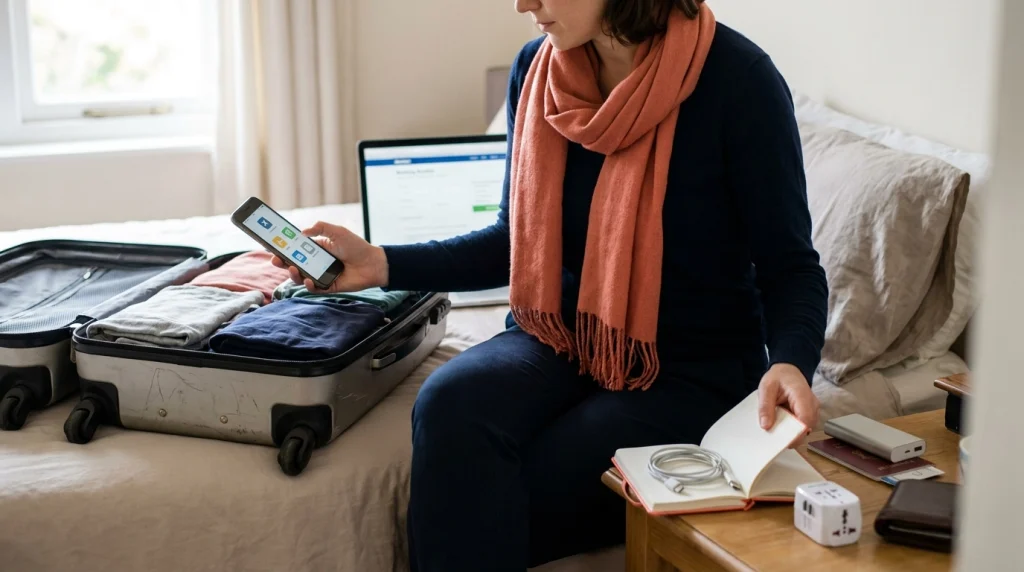
Install and test your essential apps at least a few days before you leave. Travel day is a poor time to discover that an account needs a verification code sent to an old phone number.
Use this pre-departure phone checklist
- Update your phone: Install important operating-system and app updates before the trip, not on airport Wi-Fi.
- Download offline maps: Cover your accommodation, arrival point, and the areas you expect to explore.
- Download languages: Test Google Translate without mobile data.
- Sign into transport apps: Verify your phone number and payment setup before arrival.
- Open your airline app: Confirm that the correct booking appears.
- Organize reservations: Put essential flights, hotels, and transportation in one itinerary system.
- Prepare connectivity: Configure your carrier plan, SIM, or eSIM before you need it.
- Check banking access: Confirm how authentication and card controls work abroad.
- Save emergency details: Verify local emergency contacts and insurance information.
- Pack power: Bring the correct charging cable, adapter when needed, and an airline-compliant portable battery.
Run an airplane-mode test
This is my favorite final check because it exposes false assumptions quickly. Put the phone in airplane mode and see what information you can still reach.
- Can you open the destination map?
- Can you see the accommodation address?
- Can your translation pack work?
- Can you access important booking details?
- Can you find your insurance contact information?
Then reconnect and test the services that require data. A five-minute rehearsal at home is easier than troubleshooting after midnight in an unfamiliar terminal.
Think about privacy as well as safety
Do not grant every app permanent location access simply because you’re traveling. Review permissions and use the minimum access that lets the feature work properly.
- Remove travel apps you no longer use.
- Use a screen lock and biometric authentication where appropriate.
- Avoid posting your real-time accommodation details publicly.
- Keep account-recovery information current.
- Use unique passwords for important accounts.
Section Takeaway: A prepared app is more valuable than an installed app. Log in, download offline content, test permissions, and rehearse your backup plan before departure.
Solo Travel Apps FAQ
What are the most important apps for a first-time solo female traveler?
Start with Google Maps, Google Translate for international trips, a messaging app such as WhatsApp, your airline app, the main local transport or ride-hailing app, your banking app, and a mobile-data solution. An itinerary app and women-focused community app can be useful extras.
Should a solo female traveler use a safety or panic-button app?
A dedicated safety app can add another layer, but check exactly where its emergency features work. Do not assume an alert button automatically contacts local emergency services worldwide, and keep verified emergency information outside the app as a backup.
Which travel apps work without internet?
Google Maps can store supported map areas, while Google Translate can use downloaded language packs. Other travel apps may cache limited information, but live location, ride booking, banking, flight updates, and community features usually depend on connectivity.
Is WhatsApp useful for women traveling alone?
Yes. It can be useful for messaging accommodation hosts, communicating with contacts, and temporarily sharing live location with someone you trust. Availability and local popularity vary, so check which messaging services are commonly used at your destination.
Do I need an eSIM app for solo travel?
Not always. Your existing carrier may offer a suitable roaming plan, while another traveler may prefer a local SIM or eSIM. Compare coverage, phone compatibility, activation rules, trip length, and expected data use before deciding.
Should I download travel apps before or after arriving?
Download and configure essential apps before departure whenever possible. Account verification, offline downloads, payment setup, and software updates are easier to handle on a reliable home connection than after landing.
How many travel apps are enough?
There is no ideal number, but a small prepared stack is better than dozens of unused apps. Cover navigation, communication, translation, transportation, bookings, money, mobile data, and your specific destination needs first.
Build a Small Travel App Stack You Can Actually Use
The answer to what apps should a woman install before solo travel is not one magical safety app. Your strongest setup combines navigation, communication, transportation, access to money, organized bookings, reliable mobile data, and verified emergency information.
Start with Google Maps, Google Translate when needed, WhatsApp or another common messaging tool, your airline and local transport apps, a banking app, an itinerary organizer, and your chosen mobile-data service.
- Download offline information before departure.
- Test every critical login.
- Research destination-specific transport apps.
- Keep temporary location sharing private.
- Save essential information outside your phone.
- Check official safety and health guidance shortly before travel.
Most importantly, keep the system simple. When you’re standing in an unfamiliar station with five percent battery, the best travel app is the one you’ve already configured and know how to use.