
How GPS Tracker Works Without Internet Explained Simply and Clearly
GPS trackers can work without internet by relying on satellite signals to determine location. This guide explains how GPS trackers operate offline, how they store and transmit data, and practical ways to use them without constant internet access.
Key Takeaways
- GPS trackers rely on satellites: They receive signals from GPS satellites to pinpoint location without needing internet.
- Offline tracking stores data locally: Trackers can save location info internally when no internet is available.
- Data transmission varies: Some trackers upload data later when a connection is available, while others use SMS or radio.
- Use cases for offline GPS: Ideal for remote areas or situations with poor connectivity.
- Battery life considerations: Offline mode often conserves battery by limiting data transmission.
- Troubleshooting common issues: Includes signal loss, data syncing delays, and device settings.
- Choosing the right tracker: Depends on your need for real-time updates versus periodic location logging.
How GPS Tracker Works Without Internet Explained Simply and Clearly
If you’ve ever wondered, “Can a GPS tracker work without internet?” you’re in the right place. In this guide, we’ll break down how GPS trackers function offline, how they collect and store location data, and how you can use this technology effectively when there’s no internet connection.
By the end, you’ll understand the basics of GPS satellite communication, offline data logging, and how to troubleshoot common problems. Whether you want to track a vehicle in a remote area or monitor assets without cellular service, this guide has you covered.
Understanding GPS Technology: The Basics
Before diving into offline tracking, let’s quickly review how GPS works in general.
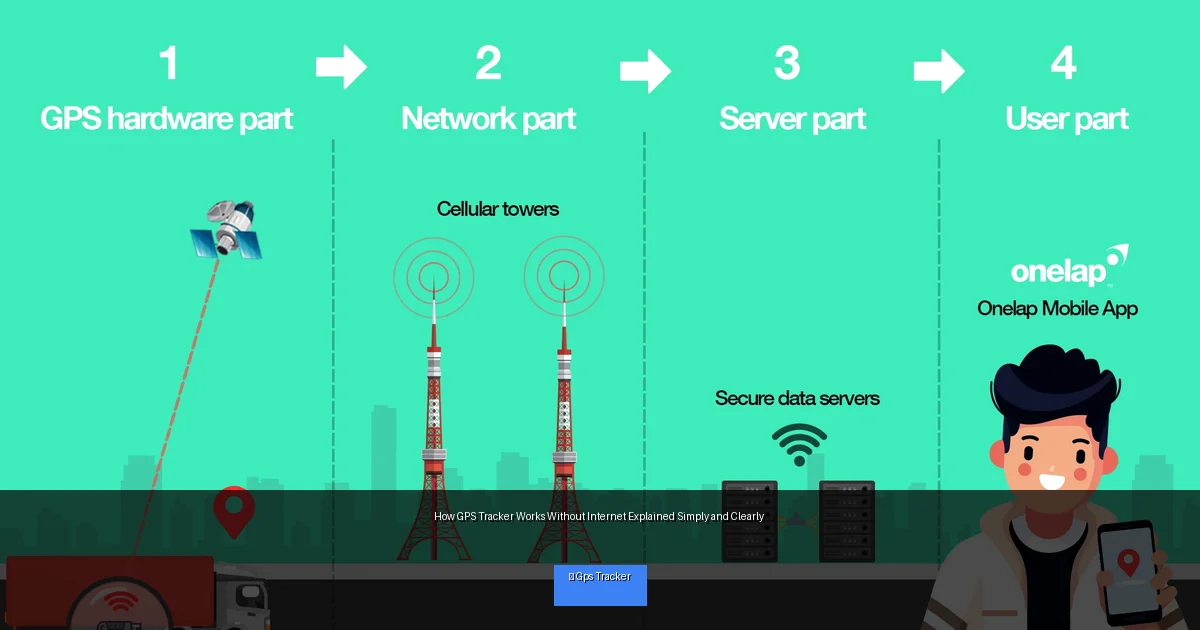
Visual guide about How GPS Tracker Works Without Internet Explained Simply and Clearly
Image source: onelap.in
What Is GPS?
GPS stands for Global Positioning System. It’s a network of about 30 satellites orbiting Earth, constantly sending out signals.
How Does a GPS Tracker Get Your Location?
A GPS tracker receives signals from multiple satellites and calculates your exact position by measuring the time it takes for each signal to arrive.
Internet vs. GPS Signals
GPS satellites broadcast signals freely to the earth. This means the GPS part of a tracker does not need internet to determine location. However, internet or cellular connectivity usually helps send that location information to your phone or computer.
Step-by-Step: How a GPS Tracker Works Without Internet
Step 1: Receiving Satellite Signals
- The GPS tracker constantly listens for signals from satellites overhead.
- It needs at least four satellite signals to accurately pinpoint location (latitude, longitude, altitude).
- This process happens automatically and does not require internet or cellular service.
Step 2: Calculating Location
- Once the signals are received, the device’s internal processor calculates the coordinates.
- This calculation is immediate and stored inside the device.
- The accuracy can be within meters depending on signal strength and device quality.
Step 3: Storing Location Data Locally
- If there’s no internet or cellular network, the tracker saves the location data internally.
- This storage can be on internal memory or an SD card depending on the model.
- Data is timestamped to keep track of when the location was recorded.
Step 4: Transmitting Data When Internet Is Available
- Once the device connects to a network (Wi-Fi, cellular, or satellite), it uploads stored data.
- This can be done via mobile data, SMS, or specialized transmission methods.
- You receive location updates even if there was no connection during tracking.
Step 5: Real-Time Tracking vs. Delayed Updates
- Without internet, real-time tracking is not possible.
- Data is sent in batches once connectivity returns.
- Some trackers use SMS to send location coordinates without internet but require cellular signal.
Practical Tips for Using GPS Trackers Without Internet
Choose a Tracker With Internal Memory
Ensure your GPS tracker can store location data offline. This way, it won’t lose any info when out of network range.
Consider Satellite Communication Options
Some advanced trackers use satellite networks (like Iridium or Globalstar) to send data without cellular internet.
Use SMS-Based Trackers Where Cellular Signal Exists
If internet isn’t available but cellular signals are, SMS updates can be a reliable alternative.
Plan for Regular Syncing
Set your tracker to upload data when it reconnects to the internet or cellular network to keep your records up to date.
Optimize Battery Life
Offline mode reduces data transmission, which can save battery. Adjust update intervals accordingly.
Test in Offline Conditions
Before relying on offline tracking, test your device in no-internet zones to confirm it stores and transmits data correctly.
Troubleshooting Common Issues
Problem: GPS Signal Not Found
- Move tracker to an open area without tall buildings or dense trees.
- Restart the device to reset satellite connections.
- Check device firmware updates for better satellite reception.
Problem: Data Not Uploading After Reconnection
- Ensure the tracker is set to auto-upload stored data.
- Check your network connection and data plan limits.
- Manually sync through the tracker’s app or software if available.
Problem: Battery Draining Quickly
- Reduce tracking frequency or disable unnecessary features.
- Use power-saving modes if the device offers them.
- Replace or recharge batteries regularly.
Conclusion
Understanding how a GPS tracker works without internet helps you make better decisions on tracking in remote or offline environments. Remember, GPS satellites provide location data freely, but sending that data to you often requires some form of connectivity.
By choosing the right device and using offline storage effectively, you can track assets, vehicles, and loved ones even without internet access. With this knowledge, you’re ready to select and operate GPS trackers confidently, no matter where you are.
