
How GPS Tracker Works in Mobile Explained for Easy Understanding
How GPS tracker works in mobile is simpler than many think. This guide breaks down the technology behind GPS tracking in phones, explains how it locates your position, and offers easy steps to use it effectively. Whether for navigation, safety, or apps, understanding GPS in mobile devices helps you get the most out of this powerful tool.
Key Takeaways
- GPS Basics: Mobile GPS uses satellites to pinpoint your location anywhere on Earth.
- How Mobile GPS Works: Your phone receives signals from multiple satellites to calculate accurate position data.
- Role of Mobile Networks: Cellular and Wi-Fi networks assist GPS for faster and more reliable location tracking.
- Benefits of GPS Tracking: It’s useful for navigation, safety, asset tracking, and location-based services.
- Setting Up GPS on Mobile: Enabling location services and using GPS apps is simple and quick.
- Improving GPS Accuracy: Using Wi-Fi, clearing obstacles, and updating software enhance GPS performance.
- Troubleshooting Tips: Common GPS issues can be fixed with basic steps like restarting or recalibrating the GPS.
Introduction: What You Will Learn About GPS Trackers in Mobile Phones
If you’ve ever used a map app or shared your location with friends, you’ve experienced the power of GPS tracking in your mobile phone. But how exactly does a GPS tracker work in mobile devices? This guide will explain the technology behind GPS tracking in simple terms. You will learn how your phone determines its location, the role of satellites and networks, and how to make GPS tracking more accurate. Plus, we’ll walk you through setting up and troubleshooting your mobile GPS. By the end, you’ll understand how to use GPS in your phone confidently and efficiently.
Step 1: Understanding the Basics of GPS Technology
What is GPS?
GPS stands for Global Positioning System. It’s a network of about 30 satellites orbiting Earth. These satellites send signals to GPS receivers, like the one in your phone. By receiving signals from at least four satellites, your phone can calculate your exact location using a method called trilateration.
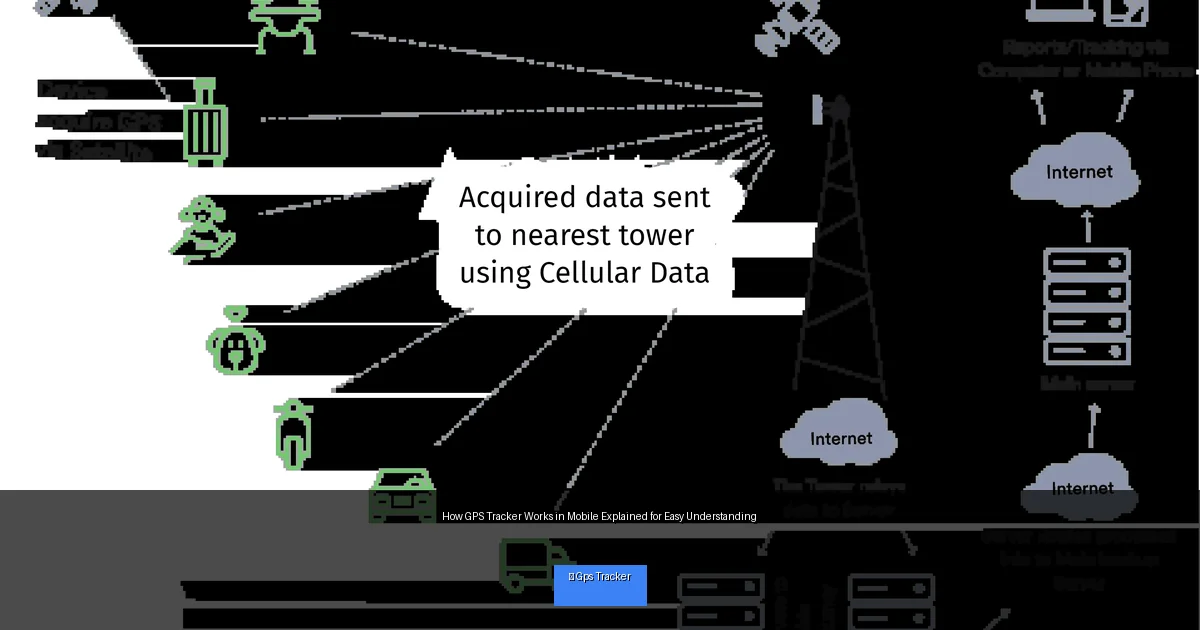
Visual guide about How GPS Tracker Works in Mobile Explained for Easy Understanding
Image source: cdn.shopify.com
How Trilateration Works
Trilateration uses the distance from multiple satellites to determine your position. Each satellite sends a signal with the time it was sent. Your phone measures how long the signal takes to arrive and calculates the distance. Using distances from multiple satellites, your phone pinpoints your latitude, longitude, and altitude.
Step 2: How GPS Tracker Works in Mobile Phones
The GPS Receiver Inside Your Phone
Your mobile device has a built-in GPS receiver chip. This chip listens for signals from GPS satellites continuously when location services are enabled. It processes the data to find out where you are on the planet.
Assisted GPS (A-GPS)
Most smartphones use Assisted GPS or A-GPS. It combines satellite data with information from cellular towers and Wi-Fi networks. This helps the phone get a faster location fix, especially in areas where satellite signals are weak, like inside buildings or in dense cities.
Using Mobile Networks and Wi-Fi
Besides satellites, your phone uses nearby cell towers and Wi-Fi hotspots to estimate location. This is called hybrid positioning. It’s less accurate than pure GPS but much faster to get a location. Many apps use GPS combined with network data for the best experience.
Step 3: How to Enable and Use GPS Tracking on Your Mobile
Turning On Location Services
To start using GPS tracking, you need to make sure location services are enabled on your phone.
- On Android: Go to Settings > Location and toggle it on.
- On iPhone: Go to Settings > Privacy > Location Services and switch it on.
Choosing Location Mode for Best Accuracy
Android phones let you select location modes:
- High Accuracy: Uses GPS, Wi-Fi, and mobile networks for best results.
- Battery Saving: Uses Wi-Fi and networks only, less accurate but saves power.
- Device Only: Uses GPS satellites only, no network assistance.
For precise tracking, select High Accuracy.
Using GPS Tracker Apps
Many apps use GPS tracking, such as Google Maps, Find My Device, or fitness trackers. Open the app, and it will request permission to access your location. Once granted, it will show your real-time location on a map.
Step 4: Practical Tips to Improve GPS Tracking Accuracy
Keep Your Phone Outdoors or Near a Window
GPS signals work best with a clear view of the sky. Being indoors or surrounded by tall buildings can block signals. For best results, use GPS outdoors or near windows.
Enable Wi-Fi Even if Not Connected
Wi-Fi helps with location accuracy by providing nearby hotspot data. Turn Wi-Fi on, even if you don’t connect to a network.
Update Your Phone’s Software
Manufacturers often improve GPS performance through software updates. Keep your phone’s OS and apps updated for better GPS accuracy.
Calibrate Your Compass
Some GPS apps depend on the phone’s compass. Calibrating it by moving your phone in a figure-eight motion can improve location accuracy.
Step 5: Troubleshooting Common GPS Problems on Mobile
GPS Not Finding Location or Taking Too Long
- Restart your phone to refresh the GPS chip.
- Toggle location services off and on again.
- Switch to High Accuracy mode in location settings.
- Clear cache for GPS-related apps.
- Make sure no app is blocking location access.
GPS Location Is Incorrect or Inaccurate
- Calibrate your compass.
- Move to an open area with a clear sky view.
- Enable Wi-Fi to assist GPS.
- Update your phone’s software.
Battery Drains Quickly When Using GPS
- Close apps that constantly use GPS in the background.
- Use battery saver mode but be aware it may reduce GPS accuracy.
- Turn off GPS when it’s not needed.
Conclusion: Mastering How GPS Tracker Works in Mobile Phones
Understanding how GPS tracker works in mobile helps you unlock the full potential of your smartphone’s location features. From satellite signals to mobile networks, your phone uses multiple technologies to provide accurate tracking. By enabling location services, selecting the right settings, and following simple tips, you can enjoy reliable navigation, safety features, and location-based apps. Troubleshooting is straightforward, so don’t worry if GPS doesn’t work perfectly at times. With this guide, you’re ready to make GPS tracking in your mobile phone work smoothly and effectively every day.
