
How Does Real Time GPS Tracking Work Explained Simply and Clearly
Real time GPS tracking lets you see the exact location of a person, vehicle, or asset live on a map. This guide explains how it works in simple steps, making complex technology easy to understand. You’ll learn how GPS devices, satellites, and data networks work together to provide accurate, instant location updates.
Key Takeaways
- GPS satellites provide location signals: Devices receive signals from multiple satellites to calculate precise locations.
- Trackers use cellular or internet networks: To send location data instantly to servers or apps.
- Real time tracking means constant updates: Locations refresh every few seconds or minutes.
- Accuracy depends on signal quality and environment: Obstacles like buildings or weather can affect GPS signals.
- Practical uses include fleet management, personal safety, and asset tracking: Real time GPS helps businesses and individuals stay connected to what matters.
- Battery life and device maintenance are crucial: Ensuring consistent tracking performance.
- Privacy and data security are important considerations: Choose trusted GPS tracking providers.
How Does Real Time GPS Tracking Work Explained Simply and Clearly
If you’ve ever wondered how you can track a vehicle, pet, or loved one instantly on your phone or computer, you’re in the right place. This guide breaks down how real time GPS tracking works in easy terms. You don’t need to be a tech expert to understand it. By the end, you’ll know the key parts and steps that make live GPS tracking possible.
What is Real Time GPS Tracking?
Real time GPS tracking means knowing the exact location of an object or person at any moment, with frequent updates. Unlike regular GPS, which only shows a location when checked, real time tracking continuously sends location data. This allows for live monitoring, which is useful for safety, logistics, and more.
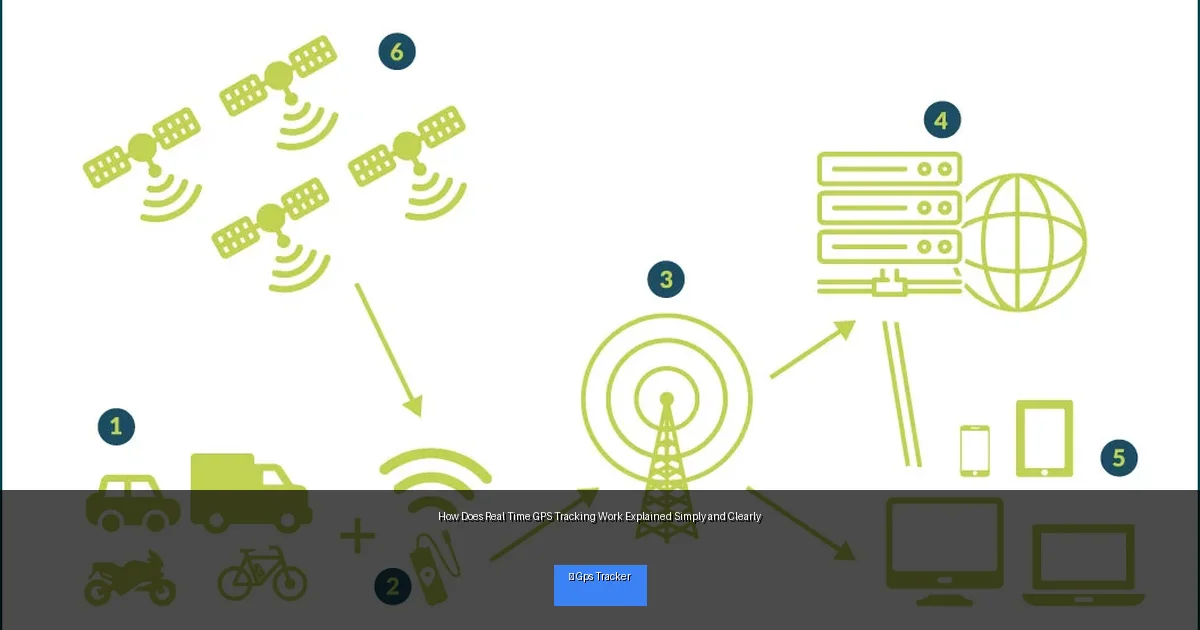
Visual guide about How Does Real Time GPS Tracking Work Explained Simply and Clearly
Image source: powunity.com
Step 1: Understanding GPS Technology
How GPS Satellites Work
The foundation of real time GPS tracking is the Global Positioning System (GPS). GPS consists of about 30 satellites orbiting Earth. These satellites send signals that GPS devices use to determine their exact location. To pinpoint a position, a GPS tracker needs signals from at least four satellites.
Trilateration Explained
GPS devices use a method called trilateration. Each satellite sends a signal with its location and the time it was sent. The device calculates how far away each satellite is based on the time delay. Using distances from multiple satellites, the device pinpoints its location on Earth.
Step 2: How a GPS Tracker Collects Location Data
The GPS Receiver Inside the Tracker
The GPS tracker has a built-in GPS receiver. This tiny chip listens to satellite signals continuously. It calculates latitude, longitude, altitude, and sometimes speed and direction based on the satellite data.
Data Update Frequency
Depending on the device and settings, the GPS tracker can update location data every few seconds or minutes. More frequent updates give smoother, more accurate real time tracking but use more battery and data.
Step 3: Sending Location Data in Real Time
Using Cellular Networks
Once the GPS tracker knows its location, it needs to share this data with you. Most real time trackers use cellular networks (like 4G or LTE) to send their location data to a central server.
Alternative Data Transmission Methods
Some trackers use Wi-Fi, Bluetooth, or satellite communication if cellular isn’t available. However, cellular is the most common for everyday use due to wide coverage and speed.
Role of Servers and Cloud Platforms
The location data from the tracker goes to secure servers. These servers process and store the information. Then, they send it to your phone or computer app so you can see the live location on a map.
Step 4: Viewing Real Time GPS Data
Mobile Apps and Web Interfaces
You usually access GPS tracking through an app or website. These platforms show a live map with the tracked object’s position updated regularly. You can set alerts, review history, and even control tracker settings.
Customization and Features
Many apps let you customize update intervals, geofence zones (virtual boundaries), and notifications for movement or arrival. This makes real time tracking practical and tailored to your needs.
Practical Tips for Using Real Time GPS Tracking
- Choose the right tracker: Consider battery life, update frequency, and network coverage for your location.
- Keep devices charged: A dead battery means no tracking data.
- Ensure good signal quality: Avoid placing GPS devices in metal boxes or underground.
- Set up geofences: Get alerts if the tracked object leaves or enters certain areas.
- Check privacy settings: Be aware of who can see location data and control permissions.
Troubleshooting Common Real Time GPS Tracking Issues
Poor or No GPS Signal
If the tracker shows inaccurate or no location, it may be due to signal blockage. Try moving the tracker to an open area away from tall buildings, thick trees, or inside metal enclosures.
Data Transmission Problems
Sometimes location updates stop due to poor cellular coverage. Check the SIM card status and network availability. Restarting the device can also help.
Battery Draining Quickly
Frequent updates and poor signal can drain battery fast. Adjust update intervals to save power. Carry portable chargers if needed.
App or Software Glitches
Keep your tracking app updated. If it freezes or crashes, try reinstalling or clearing cache.
Conclusion
Real time GPS tracking combines satellite signals, smart devices, and communication networks to deliver live location updates. It’s a powerful tool for safety, efficiency, and peace of mind. By understanding the basic steps—from satellite signal reception to data transmission and viewing—you can confidently use GPS trackers and make the most of this technology. Remember to maintain your devices, choose the right features, and stay aware of privacy considerations.
Now that you know how real time GPS tracking works, you’re ready to explore its many practical applications with confidence!

