
How to Build GPS Tracking System Step by Step for Beginners
Building a GPS tracking system is easier than you think! This guide walks you through every step, from choosing components to programming and testing your tracker. Perfect for beginners, it helps you understand how GPS tracking works and how to create a functional device at home.
Key Takeaways
- Understand GPS basics: Learn how GPS satellites and receivers work to track location.
- Choose the right hardware: Select GPS modules, microcontrollers, and communication devices suitable for your project.
- Set up software: Program your microcontroller to read GPS data and transmit it for tracking.
- Build the circuit: Connect components carefully to ensure reliable operation.
- Test and troubleshoot: Verify tracking accuracy and fix common issues.
- Implement data transmission: Use GSM, Wi-Fi, or Bluetooth to send location data.
- Apply practical tips: Enhance battery life and improve signal reception for better performance.
How to Build GPS Tracking System Step by Step for Beginners
If you want to learn how to build a GPS tracking system, you are in the right place! In this guide, we will cover everything from the basics of GPS technology to assembling and programming your own tracker. Whether you want to track your car, bike, or personal belongings, this step-by-step tutorial will help you make a functional GPS tracker with simple tools and components.
Introduction to GPS Tracking Systems
A GPS tracking system uses signals from satellites to determine the exact location of an object. The system consists of a GPS receiver module that calculates coordinates and a communication module that sends this data to a server or mobile device. By building your own system, you gain control over the hardware, software, and data privacy.
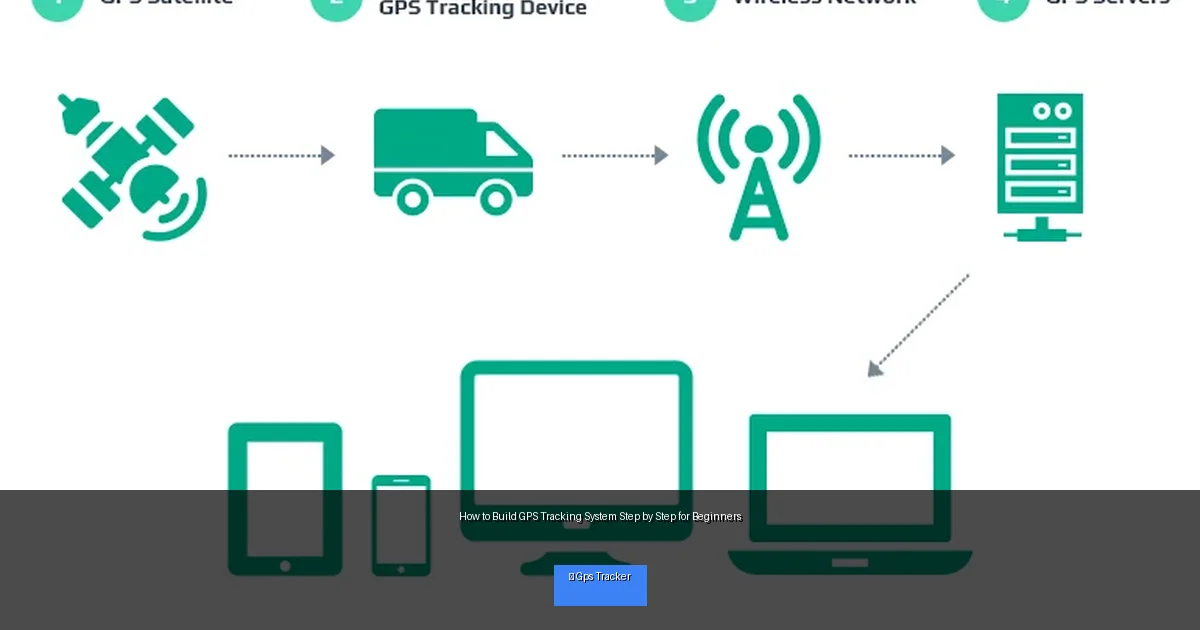
Visual guide about How to Build GPS Tracking System Step by Step for Beginners
Image source: d17ocfn2f5o4rl.cloudfront.net
Step 1: Gather the Required Components
Before starting, make sure you have all the necessary parts. Here’s what you need:
- GPS Module: A device like the NEO-6M GPS module receives satellite signals and provides location data.
- Microcontroller: Arduino Uno or ESP32 are popular choices to process GPS data.
- Communication Module: GSM module (SIM800L) for cellular data, or Wi-Fi module for internet connection.
- Power Supply: Battery pack or USB power bank to power the tracker.
- Connecting Wires and Breadboard: For circuit assembly.
- SIM Card: If using GSM module, a SIM card with data plan is necessary.
- Optional: Enclosure box to protect the device.
Step 2: Understand the Circuit Layout
Before wiring, understand how components connect:
- The GPS module connects to the microcontroller’s serial pins to send location data.
- The communication module also uses serial communication to transmit data.
- The power supply must provide stable voltage (usually 5V or 3.3V) as per component specs.
Example Wiring
- GPS TX pin → Microcontroller RX pin
- GPS RX pin → Microcontroller TX pin (if needed)
- GSM TX → Microcontroller RX
- GSM RX → Microcontroller TX
- Power supply → VCC and GND of all modules
Step 3: Assemble the Hardware
Connect the GPS Module
Use jumper wires to connect the GPS module’s TX and RX pins to the microcontroller’s serial pins. Make sure to provide power and ground.
Connect the Communication Module
If using a GSM module, connect it similarly via serial pins. Insert a SIM card before powering up. For Wi-Fi, connect the module to the microcontroller and configure network settings later.
Power the System
Attach the battery or power bank carefully. Ensure voltage matches the components. Use voltage regulators if required.
Step 4: Program the Microcontroller
Install Development Environment
Download and install Arduino IDE or platform suitable for your microcontroller.
Write the Code
The code should:
- Initialize GPS and communication modules.
- Read GPS coordinates from the GPS module.
- Send location data via GSM or Wi-Fi module.
- Handle errors and delays efficiently.
Sample Code Snippet
Here’s a simplified example for Arduino with GPS and GSM modules:
#include <SoftwareSerial.h>
#include <TinyGPS++.h>

SoftwareSerial gpsSerial(4, 3); // RX, TX for GPS
SoftwareSerial gsmSerial(7, 8); // RX, TX for GSM
TinyGPSPlus gps;

void setup() {
  Serial.begin(9600);
  gpsSerial.begin(9600);
  gsmSerial.begin(9600);
}

void loop() {
  while (gpsSerial.available() > 0) {
    gps.encode(gpsSerial.read());
  }

  if (gps.location.isUpdated()) {
    float lat = gps.location.lat();
    float lng = gps.location.lng();
    String data = "Lat:" + String(lat,6) + ",Lng:" + String(lng,6);
    sendData(data);
  }
}

void sendData(String data) {
  gsmSerial.println("AT+CMGF=1"); // SMS mode
  delay(100);
  gsmSerial.println("AT+CMGS=\"+1234567890\""); // Recipient number
  delay(100);
  gsmSerial.print(data);
  delay(100);
  gsmSerial.write(26); // Ctrl+Z to send
  delay(5000);
}
Step 5: Test Your GPS Tracking System
Power on your system and wait for the GPS to get satellite lock. Once coordinates are received, the system should send location data via your communication module.
Tips for Testing
- Test outdoors for better satellite reception.
- Use serial monitor in Arduino IDE to debug and view data.
- Check SIM card balance if using GSM.
Step 6: Troubleshooting Common Issues
GPS Module Not Getting Fix
- Move outdoors or near a window for better signal.
- Check power supply and wiring connections.
- Give the GPS module a few minutes to acquire satellites.
Communication Module Fails to Send Data
- Ensure SIM card is active and has data credit.
- Verify wiring and baud rates match in code.
- Check antenna connection for GSM module.
Microcontroller Not Responding
- Confirm correct COM port and board selected in IDE.
- Reset the board and re-upload code.
- Try simple test sketches to check hardware functionality.
Step 7: Improve and Expand Your System
Once your basic GPS tracker works, consider:
- Adding an LCD display to show coordinates.
- Storing data on an SD card for logging.
- Using a mobile app or web server to view real-time location.
- Optimizing power consumption for longer battery life.
Conclusion
Building a GPS tracking system is a fun and educational project for beginners. By following these steps, you can create your own tracker using affordable components and simple programming. Remember to take your time, test each step, and troubleshoot carefully. Soon, you will have a working GPS tracker to monitor your assets or loved ones with confidence!
🎥 Related Video: Building a DIY GPS Tracker Project with the Arduino UNO Development Board #arduino #electrician #gps
📺 SparkLabx
more details here: https://www.skool.com/diy.
